




Touchscreen Motorcycle Gloves: The Complete Buyer's Guide
Quick Answer: Touchscreen motorcycle gloves use conductive thread or material embedded in the fingertips — typically the thumb and index finger — to activate capacitive touchscreens without removing your gloves. Deerskin is the best base leather for touchscreen gloves because its natural thinness and low insulation allow electrical signals to pass through cleanly. A quality pair lets you operate your phone or GPS at a stoplight safely and without fumbling.
Why Touchscreen Gloves Matter for Riders in 2024
Motorcycle riding has always demanded split attention. Add a GPS mount, a Bluetooth intercom, and a phone holder to your handlebars and you have a cockpit that demands fingertip interaction every few miles. Standard leather gloves force you to peel them off every time you need to accept a call, reroute navigation, or change a playlist. In winter that's a miserable experience. In heavy traffic it's a safety risk.
Touchscreen-capable gloves solve this by making the glove itself conductive at the contact points. Done right, the result is a glove you never have to remove. Done poorly, it's a glove that frustrates you at every stoplight.
This guide covers everything a rider needs to know before buying: how the technology works, what materials perform best, what separates a quality glove from a cheap one, and what to look for if you're buying American-made.
How Touchscreen-Capable Fingertips Work
Smartphone screens and GPS units use capacitive touch technology. A capacitive screen works by detecting changes in an electrical field at the screen's surface. Human skin conducts a small electrical charge — when a bare fingertip touches the screen, it disrupts the field and registers a tap. Standard leather or textile gloves block that charge entirely.
Touchscreen gloves solve this in one of two ways:
- Conductive thread: A thread woven from electrically conductive fiber (usually silver or carbon-infused) is sewn into the fingertip panels. The thread creates a conductive bridge from your skin through the leather to the screen surface.
- Conductive coating or patch: A small patch of conductive material — sometimes a metallic polymer film — is bonded to the fingertip interior. Less common in premium gloves but used in some budget options.
Both methods work on the same principle: complete a circuit between your finger and the screen. The difference is longevity. Conductive thread woven into the leather holds up through years of use and repeated washing. Conductive patches can delaminate or wear out faster, especially on cheaper gloves.
Why Deerskin Is the Best Base Material for Touchscreen Gloves
The base leather matters as much as the conductive thread. Here's why deerskin outperforms cowhide, pigskin, and synthetic materials for touchscreen use:
Natural thinness: American Whitetail deerskin is roughly half the weight of comparable cowhide at equivalent thickness grades. Thinner leather means less material between your fingertip and the screen — and less interference with the conductive signal. On a thick cowhide glove, even good conductive thread can struggle because the overall material stack is too deep.
Natural pliability: Deerskin conforms to the contour of a touchscreen surface more completely than stiffer leathers. A stiff cowhide fingertip contacts the screen with a smaller surface area, reducing touch reliability. Deerskin drapes and flexes, giving the conductive thread full contact across the fingertip pad.
Low insulation: Leather's insulating properties work against touchscreen function. Deerskin's thinner, more open fiber structure insulates less than cowhide, which helps the electrical signal transfer. This is one reason thin knit gloves work well for touchscreen use — and why deerskin approximates that benefit in a full riding glove.
Which Fingers Matter Most: Thumb and Index Finger
Most touchscreen interactions on a motorcycle happen with the thumb and index finger. The thumb handles swiping and accepting calls; the index finger handles precision taps — rerouting on a GPS, entering a waypoint, pressing a button on a mounted phone. These are the two fingers that must have reliable conductivity.
Premium touchscreen motorcycle gloves embed conductive thread in both the thumb and index finger of each hand. Some budget options only treat one finger per hand. If you're buying gloves specifically for touchscreen navigation, confirm both fingers are treated before purchasing.
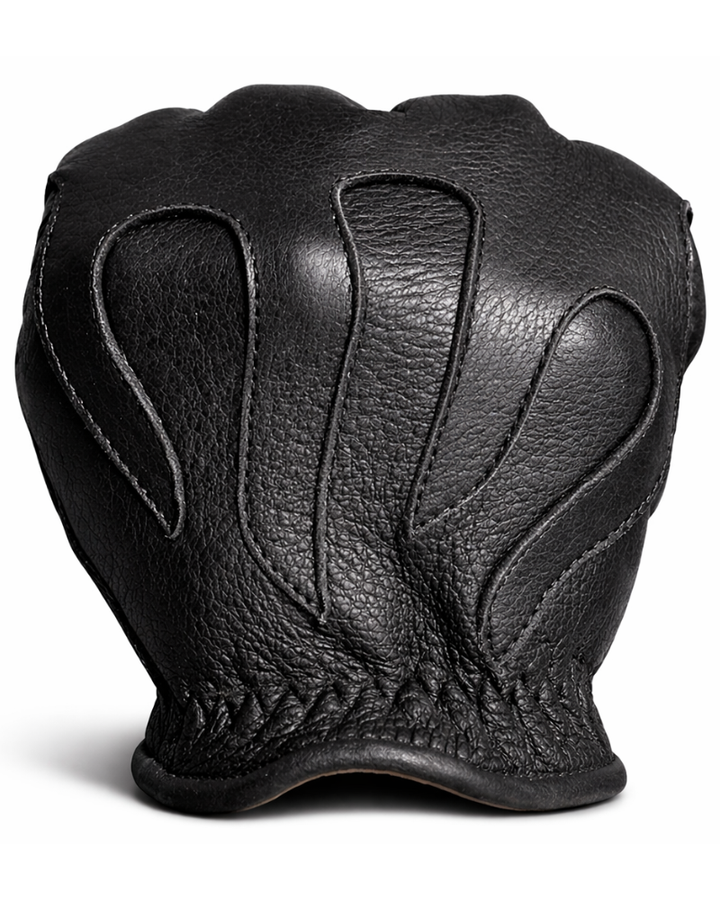
The Legendary Deerskin Short Wrist Touchscreen Gloves use conductive thread in both the thumb and index finger across deerskin fingertip panels — the combination that gives you the cleanest signal without requiring a bare fingertip or a stylus.
Will Touchscreen Gloves Work With All Phones and GPS Units?
Capacitive touchscreens are now universal across smartphones (iPhone, Android) and most modern GPS units including Garmin, TomTom, and Zumo models. Touchscreen gloves will work with all of these.
Older resistive touchscreens — found on some budget GPS units from the early 2010s — required physical pressure rather than a capacitive signal. Touchscreen gloves do not activate resistive screens. If your GPS predates 2015, confirm it uses capacitive touch before expecting glove compatibility.
One variable worth noting: screen sensitivity settings. Some phones have an "increase touch sensitivity" or "glove mode" setting in the display or accessibility menu. Enabling this can dramatically improve responsiveness through a glove, even a well-made one. On iPhone, this is found under Settings > Accessibility > Touch > Reachability or direct touch adjustments. On Android it varies by manufacturer but is commonly under Display settings.
Does Touchscreen Sensitivity Degrade Over Time?
It depends on the construction method. Conductive thread woven through the fingertip leather is durable and does not degrade meaningfully with normal use and cleaning. The conductive properties of the thread fiber (typically silver or carbon) are intrinsic to the material — they don't wash out or wear off the surface.
What does degrade over time is the connection between thread and fingertip. On poorly constructed gloves, the conductive thread may be surface-stitched rather than woven through the panel. Surface stitching can abrade and break. Look for gloves where the thread is integrated into the fingertip panel construction, not just added as an afterthought stitch on top of the leather.
Proper glove care extends touchscreen life. Avoid petroleum-based conditioners on the fingertips — they can coat the thread and reduce conductivity. Use a pH-neutral leather conditioner sparingly on the fingertip area.
Can You Use Touchscreen Gloves in the Rain?
Yes, with some caveats. Capacitive screens can register water droplets as touch inputs, which means a wet screen may behave erratically regardless of your gloves. This is a screen problem, not a glove problem. Most modern phones handle light rain reasonably well — their touch processing software filters out the water noise to some extent.
The glove itself: deerskin has a natural water resistance due to its tight fiber structure, but it is not waterproof. In sustained rain, deerskin will absorb moisture. A wet glove will still conduct — water is more conductive than dry leather — so touchscreen function often improves in light rain. In heavy downpour, you should not be operating your phone at all.
The more important consideration for wet riding is glove drying and conditioning afterward. Deerskin that dries out without conditioning can stiffen. Always condition deerskin after it gets thoroughly wet.
Glove Thickness vs Touchscreen Responsiveness
This is one of the most direct trade-offs in touchscreen glove design. Thinner leather = better touchscreen responsiveness. Thicker leather = more protection and warmth but weaker signal.
The resolution is material selection. A thin deerskin glove outperforms a thick cowhide glove for touchscreen use while maintaining equivalent abrasion protection, because deerskin achieves its strength through fiber density rather than raw thickness. You get a thinner palm and fingertip with no loss in protection.
For maximum touchscreen performance, avoid heavily lined gloves (thick insulation between your finger and the leather adds another layer the signal must cross). Unlined or lightly lined deerskin gloves are the optimal choice for riders who prioritize navigation use.
For riders who want both cut resistance and touchscreen function, the Legendary Aramid Lined Touchscreen Gloves achieve this by keeping the aramid lining thin and using deerskin outer panels — the combination maintains usable touchscreen performance while adding industrial-grade cut resistance.
Touchscreen Gloves vs Regular Gloves: Real-World Riding Difference
If you do not mount a phone or GPS and never interact with a device while riding, you do not need touchscreen gloves. A standard riding glove with no conductive fingertips is mechanically identical — same leather, same construction, one fewer feature.
If you use navigation, the difference is substantial. Without touchscreen gloves, every map interaction requires: pulling over or stopping, removing at least one glove, interacting with the device, replacing the glove, and resuming. In city riding that can add minutes to a route change. In cold weather it's genuinely uncomfortable. With a quality touchscreen glove, you tap the screen at a red light and ride on.
Riders who use Bluetooth intercoms with paired phones also benefit — answering or declining calls, adjusting volume, and switching tracks all become single-tap interactions while stationary.
Safety: Do Touchscreen Gloves Offer Less Protection?
Not if the glove is designed correctly. The conductive thread or patch adds nothing to the exterior of the glove — it's either integrated into the fingertip panel or stitched through it. The abrasion surface of the fingertip is the same leather regardless of whether the thread is present.
Where safety can be compromised is in budget gloves that thin the fingertip leather to improve touchscreen signal. This is a real risk in cheap imports. The fingertips and palm heel are the highest-impact zones in a low-speed crash — they are the wrong place to cut material weight for cost savings.
American-made gloves from established manufacturers use full-weight leather at all protection zones. The conductive capability is added to, not substituted for, the protective structure of the fingertip.
How to Test Touchscreen Sensitivity Before Buying
If you're buying in person, ask to test the glove on your own phone before purchasing. Wake the screen, attempt to swipe, tap a small target (like a navigation button), and test precision input. A glove with good touchscreen function will feel nearly as responsive as a bare finger. A marginal glove will require deliberate pressure and may miss small targets.
If buying online, look for the following indicators of quality construction:
- Conductive thread woven into the fingertip panel (not a patch)
- Both thumb and index finger treated on each hand
- Deerskin or thin goatskin as the outer material
- Manufacturer description of the conductive method (not vague "touchscreen compatible" language)
American-Made Touchscreen Gloves vs Cheap Alternatives
The import market is flooded with touchscreen motorcycle gloves at low price points. The problems are consistent: thin synthetic leather that wears out quickly at the fingertips, conductive patches that delaminate after a few months, and poor fit because the patterns are not designed for riding grip positions.
American-made deerskin gloves are cut from domestic hides processed by tanneries with generations of experience. The Churchill family has been processing American Whitetail deerskin for over 127 years — the leather quality and consistency of a domestic hide simply cannot be replicated by imported alternatives at any price point.
The cost difference between a well-made American touchscreen glove and a cheap import is real. So is the performance gap — and the lifespan gap. A quality deerskin glove properly cared for will outlast three to five cycles of cheap imports and will maintain its touchscreen function throughout.
Touchscreen Gloves for Navigation: Best Use Cases
The riders who benefit most from touchscreen-capable gloves:
- Daily commuters who check traffic and reroute frequently
- Touring riders on multi-day trips where GPS waypoints change constantly
- Bluetooth intercom users who manage calls and audio at stops
- Urban riders where stop-and-go creates regular device interaction opportunities
Riders on purely recreational rides on familiar roads with no phone mount may find the feature irrelevant. But for anyone navigating unfamiliar territory or commuting in a connected way, touchscreen capability is the difference between a glove that fits your riding life and one that creates friction every time you stop.
What Makes a Touchscreen Glove Fail
The most common failure modes:
- Broken conductive thread: Thread that was surface-stitched rather than integrated into the panel breaks at stress points (the crease where the fingertip bends). Result: intermittent or dead touchscreen function.
- Delaminated patch: Conductive patches that separate from the leather interior. Common in budget gloves after repeated flexing.
- Leather conditioning on the fingertip: Oil-based or wax conditioners applied heavily to the fingertip can coat the conductive thread and reduce signal. Use conditioner sparingly in this area.
- Wrong screen settings: Some phones in power-saving mode reduce touch sensitivity. Not a glove failure — but easily mistaken for one.
- Screen protectors: Thick tempered glass screen protectors reduce capacitive sensitivity for everyone, gloved or not. Slim film protectors are much more glove-friendly.
Frequently Asked Questions About Touchscreen Motorcycle Gloves
Do touchscreen motorcycle gloves work on all iPhone models?
Yes. All iPhone models from the iPhone 4 onward use capacitive touchscreens. Touchscreen gloves with conductive fingertips work on any current iPhone model. Enabling "Touch Accommodations" in iOS Settings can further improve sensitivity if you find the glove response marginal.
Will touchscreen gloves work on a Garmin Zumo XT GPS?
Yes. The Garmin Zumo XT uses a capacitive touchscreen and is designed for gloved operation. Garmin explicitly tests its motorcycle GPS units for gloved use. A deerskin touchscreen glove with conductive thumb and index finger will work reliably on the Zumo XT.
Do I need touchscreen capability on both hands or just one?
Both hands is strongly preferable. Your dominant hand manages throttle and brake inputs — at a stop you'll use whichever hand is freest first. Having only one hand conductive forces you to always use that specific hand, which adds awkwardness. Quality gloves treat both thumb and index finger on both hands.
Can I add touchscreen capability to regular motorcycle gloves?
There are aftermarket conductive fingertip caps available as add-ons, but these don't work well with most leather riding gloves. The cap sits over the fingertip leather, adding yet another layer between your finger and the screen. The result is typically poor. Purpose-built touchscreen gloves with integrated conductive thread are always the better solution.
How thick can a glove be and still work for touchscreen use?
In practical terms, unlined or lightly lined gloves under 2mm total fingertip thickness work well. Heavily insulated winter gloves with thick liners generally do not provide reliable touchscreen function regardless of conductive thread quality — the total material stack is too deep for the signal to cross cleanly.
Is conductive thread the same as silver thread? What exactly is it made of?
Not always the same. Conductive thread is the category. Silver-coated nylon or polyester thread is the most common implementation — silver is highly conductive and resists oxidation. Carbon-fiber-based conductive threads are also used. Both work on the same principle. Silver thread tends to maintain conductivity longer in launder cycles.
Do touchscreen motorcycle gloves work in very cold temperatures?
Cold temperatures reduce conductivity slightly — your own skin becomes less conductive when cold. For winter riding, the combination of cold skin, a glove lining, and the leather panel creates a challenging signal path. If cold-weather navigation is a priority, look specifically for winter touchscreen gloves engineered for it, or use the phone's glove mode setting to compensate.
Can I use touchscreen motorcycle gloves with a Ram Mount or Quad Lock phone holder?
Yes. Both Ram Mount and Quad Lock use standard smartphones in their cradles, and the screen remains fully accessible through the case. Any touchscreen-capable glove that works with your phone directly will work equally well with these mounting systems.
Are deerskin touchscreen gloves appropriate for summer riding?
Unlined deerskin gloves are excellent for summer riding. Deerskin breathes better than cowhide at equivalent thickness, and a short-wrist cut keeps air flowing at the wrist. The touchscreen feature adds no bulk or heat. Perforated deerskin with conductive fingertips is the optimal summer touring glove if navigation is part of your ride.
How do I know if the touchscreen feature has stopped working on my gloves?
Test on a known-working screen with bare-finger baseline comparison. If your bare finger activates the screen normally but the glove fingertip does not register any input at all (not sluggish — completely dead), the conductive thread has likely broken or the connection has failed. If response is sluggish, try the phone's glove/sensitivity mode first before concluding the glove has failed.
Should I size up in touchscreen motorcycle gloves to improve screen contact?
No. Sizing up creates excess material at the fingertip, which actually reduces touchscreen contact by wrinkling the leather away from the screen surface. You need the glove to fit snugly so the conductive thread is pressed flat against the screen. Size your glove correctly for your hand and rely on the material's pliability (especially deerskin) to provide full fingertip contact.
What is the best way to care for touchscreen deerskin motorcycle gloves?
Clean with a damp cloth and mild soap. Condition with a pH-neutral leather conditioner — apply sparingly, especially at the fingertips to avoid coating the conductive thread. Never use petroleum-based products (mink oil, neatsfoot oil in large quantities) on the fingertip area. Allow to dry naturally away from direct heat. Proper care extends both the leather and the touchscreen function.
What is the difference between capacitive and resistive touchscreens for motorcycle gloves?
Capacitive screens (all current smartphones and modern GPS units) detect electrical signals — they require a conductive touch. Resistive screens (older GPS units, some industrial devices) detect physical pressure — they work with any stylus or firm pressure. Touchscreen motorcycle gloves are designed for capacitive screens. On a resistive screen, a gloved fingertip applying pressure will usually work without any special conductive material.